---
id: trust-untrusted-service-provider
title: The "Issuer / service provider not verified" notice
description: Learn what the "Issuer not verified" / "Service provider not verified" notice (formerly "Untrusted Service Provider") in the iGrant.io Data Wallet means, why it appears, and how to make an issuer or verifier recognised.
hide_title: false
sidebar_label: '"Not verified" provider notice'
keywords: [Issuer not verified, Service provider not verified, Untrusted Service Provider, untrusted issuer, trust list, EU Trust List, ETSI TS 119 612, trust anchor, Data Wallet, EUDI Wallet, verifiable credentials, issuer trust, verifier trust, trust notice]
slug: /trust-untrusted-service-provider/
---
> **Build this with an AI coding agent.** Install the iGrant.io Agent Skills, then ask your agent to build the integration:
>
> ```bash
> npx skills add L3-iGrant/skills
> ```
The "Issuer / service provider not verified" notice explained | iGrant.io DevDocs
import NoteBox from '@site/src/components/NoteBox';
While using the iGrant.io Data Wallet you may see an **"Issuer not verified"** notice when receiving a credential from an issuer, or a **"Service provider not verified"** notice when responding to a verifier. This page explains what the notice means, when it appears, and what you can do about it.
The Data Wallet proceeds only with trusted providers. When a provider cannot be matched against a recognised trust list, the wallet shows a warning popup rather than letting the interaction continue silently. The wording is context-aware: "Issuer not verified" during issuance and "Service provider not verified" during presentation. Earlier versions showed an inline "Untrusted Service Provider" chip or label. The meaning is the same: the party could not be matched against a recognised trust list.
## What it means
The notice is a trust status indicator. It means the credential's issuer (or, during a presentation, the verifier) could not be matched against a recognised trust list that the wallet validates against, primarily the [EU Trust List (ETSI TS 119 612)](https://www.etsi.org/deliver/etsi_ts/119600_119699/119612/02.01.01_60/ts_119612v020101p.pdf).
The credential may still be valid and correctly signed. The notice only means the wallet could not match the party against a recognised trust list, so it flags this for you to decide.
## When it appears
The notice can appear in either direction of a credential exchange, with wording matched to the context:
* **During issuance (OpenID4VCI), "Issuer not verified":** when a credential is offered by an issuer that the wallet cannot match to a trust list it validates against. This is common when evaluating credentials from an issuer other than iGrant.io's own issuer.
* **During presentation (OpenID4VP), "Service provider not verified":** when a verifier requesting credentials cannot be matched to a trust list.
## What you see in the wallet
**Trusted providers** are shown with a verified badge and their **trust service provider details**, the entry matched on the trust list.
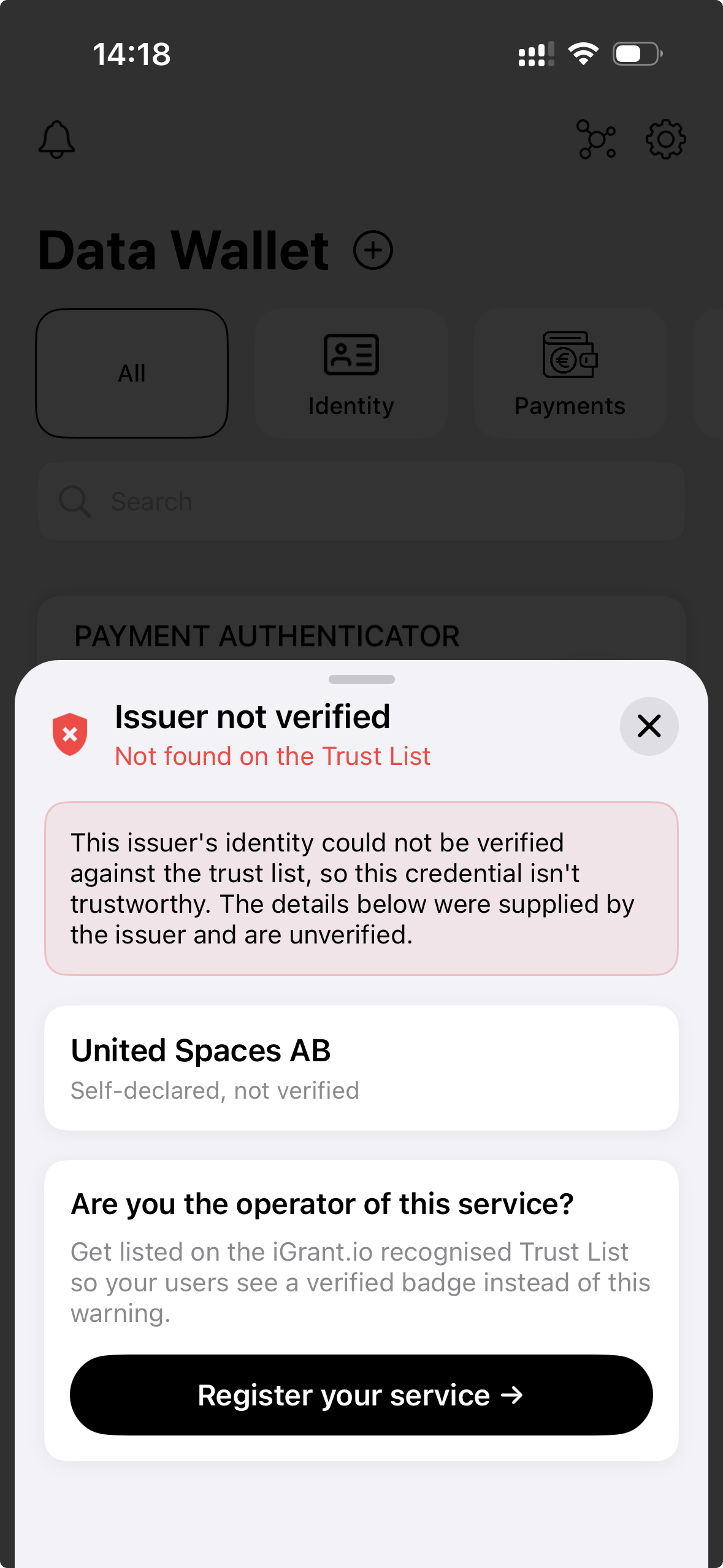
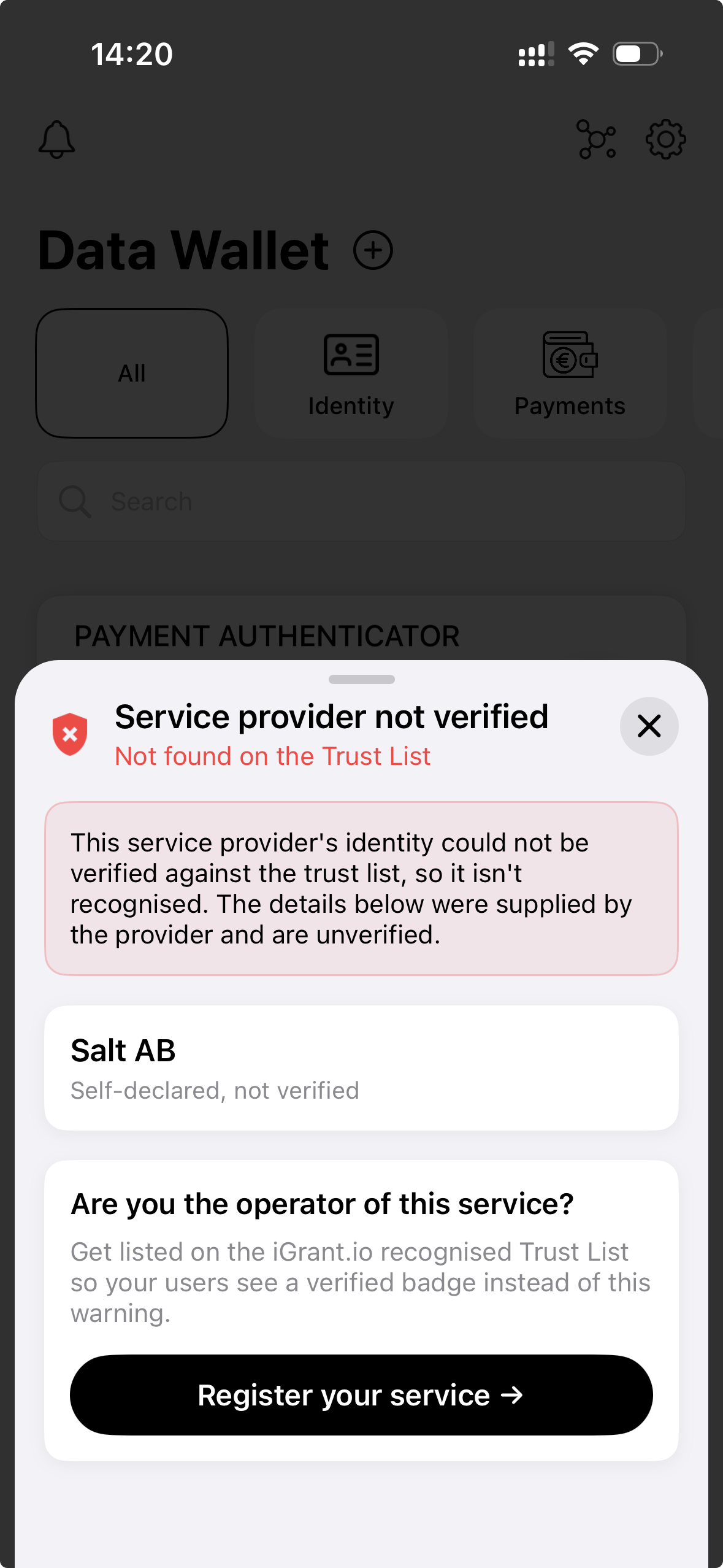
**Providers that cannot be verified** trigger a **warning popup** (a bottom sheet) instead of continuing silently. It contains:
* a heading, **"Issuer not verified"** (issuance) or **"Service provider not verified"** (presentation), with the subtitle **"Not found on the Trust List"**;
* a warning that the party's identity could not be verified against the trust list, so the credential is not trustworthy, and that the details shown were supplied by the party and are unverified;
* the organisation name, marked **"Self-declared, not verified"**; and
* an **"Are you the operator of this service?"** prompt with a **"Register your service"** button for getting listed (see [How to resolve it](#how-to-resolve-it)).
Issuer not verified (issuance)
Service provider not verified (presentation)
## Trusted versus untrusted
The wallet's trust check is reflected in the API response for a flow. The two key fields are `isVerifiedWithTrustList` and `trustServiceProvider`.
| Wallet display | API state | Meaning |
| -------------- | --------- | ------- |
| **Trusted Service Provider** (verified provider details shown) | `isVerifiedWithTrustList: true`, `trustServiceProvider` populated | The issuer or verifier was matched against a configured trust list, and its verified trust service provider details are available. |
| **Issuer not verified** / **Service provider not verified** | `isVerifiedWithTrustList: false`, `trustServiceProvider` empty | The issuer or verifier was not found on any trust list the wallet validates against. |
## How to resolve it
If you are an integrator and want an issuer or verifier to be recognised rather than flagged, the entity needs to become discoverable through a trust mechanism the wallet validates against.
For development and piloting, the quickest path is to get listed on the iGrant.io recognised Trust List, operated as a test network. See [Register as a Wallet-Relying Party](/docs/trust-relying-party-registration/). For production, the main options are:
1. **Be listed on an EU member state trusted list.** Qualified and non-qualified trust service providers are published on national trusted lists aggregated through the European List of Trusted Lists (LoTL), as per ETSI TS 119 612. This is the primary path for EUDI scenarios.
2. **Onboard through a trust anchor.** For the EBSI trust model, an entity is onboarded through the trust chain (Root Trust Anchor Operator, Trust Anchor Operator, Trusted Issuer). See the [Trust Anchor APIs](/docs/category/openid4vc-api/trust-anchor).
3. **Be added to a configured trust list.** A deployment can configure the trust authorities and trust lists it validates against using the trust authority configuration endpoints.
:::tip Register your service from the wallet
The warning popup includes a **"Register your service"** button for operators. It leads to [Register as a Wallet-Relying Party](/docs/trust-relying-party-registration/), where you generate your certificate and key id and submit your entry so users see a verified badge instead of the warning.
:::
## Is this the same as a missing Trust Anchor definition?
Not exactly, although the two are related. The Trust Anchor APIs cover onboarding an entity into a trust framework such as EBSI. The not-verified notice is driven specifically by trust list recognition at the time of issuance or presentation. An issuer that has not been onboarded to a framework the wallet recognises, and that is not present on a trusted list the wallet validates against, will surface this notice. For a full explanation of the difference, see [Trust in the Wallet Ecosystem](/docs/trust-overview/#eu-trust-list-validation-versus-trust-anchor-onboarding).
:::tip Wording may vary
The exact wording can differ across wallet versions and platforms. Current versions show **"Issuer not verified"** (issuance) or **"Service provider not verified"** (presentation); earlier versions showed **"Untrusted Service Provider"**. The underlying meaning, that the party was not matched against a recognised trust list, is the same.
:::
## Related pages
* [Register as a Wallet-Relying Party](/docs/trust-relying-party-registration/)
* [Trust in the Wallet Ecosystem](/docs/trust-overview/)
* [Trust Anchor APIs](/docs/category/openid4vc-api/trust-anchor)
* [OpenID4VP - Receive and Present Credential](/docs/openID4vp-receive-and-present-credentials/)
* [Data Wallet Features](/docs/data-wallet-features/)