Sandbox Organisations
Prerequisite: Your organisation must be onboarded as a tenant on the Organisation Wallet Suite by iGrant.io. Sandbox organisations are a built-in feature of every tenant account. If you do not yet have a tenant, contact [email protected] to get started.
Overview
Sandbox Organisations allow your tenant to create up to five simulated organisations within your account. These act as independent actors in a credential ecosystem, such as issuers, verifiers, wallet providers, or registries. They enable you to build, test, and demonstrate end-to-end credential flows without any additional infrastructure, cost, or coordination with external parties.
Whether you are a government agency preparing a national credential rollout, a bank testing identity verification workflows, or a standards body validating interoperability, sandbox organisations give you a self-contained playground to get it right before going live.
Why use sandbox organisations?
| Benefit | Description |
|---|---|
| Zero additional cost | Sandbox organisations are included in your tenant subscription. No separate licensing or provisioning required. |
| Realistic simulation | Each sandbox organisation has its own issuer and verifier configuration, allowing authentic multi-party testing. |
| Rapid prototyping | Stand up a complete credential ecosystem in minutes, not weeks. Ideal for demos, proofs of concept, and pilot programmes. |
| Safe experimentation | Test credential definitions, presentation flows, and webhook integrations without affecting your production environment. |
| Ecosystem validation | Validate interoperability across different organisational roles before committing to a live deployment. |
How it works
1. Access your sandbox organisations
From your main tenant dashboard, click on your profile menu in the top-right corner. You will see a Sandbox Organisations section listing all sandbox organisations available to your account.
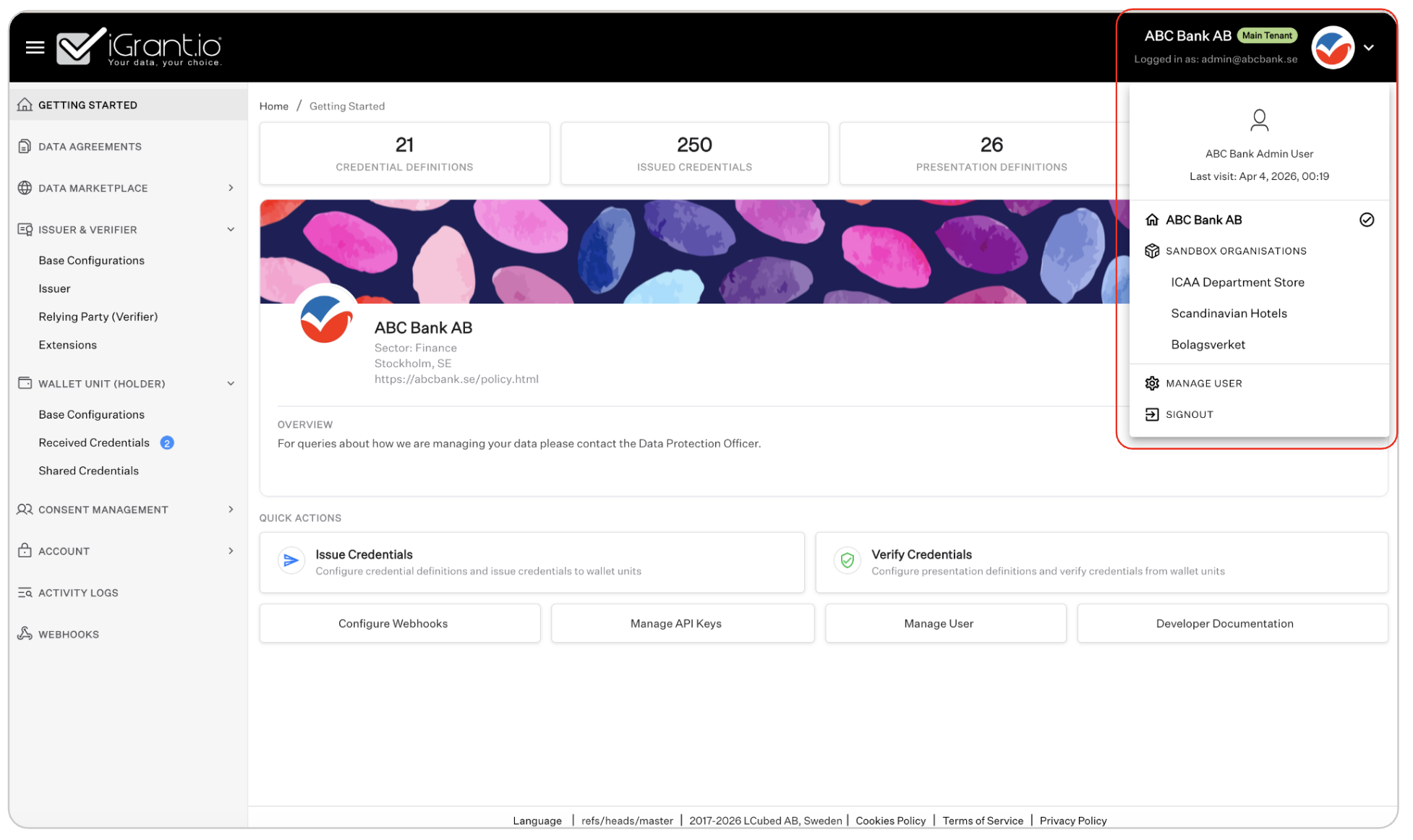
2. Switch to a sandbox organisation
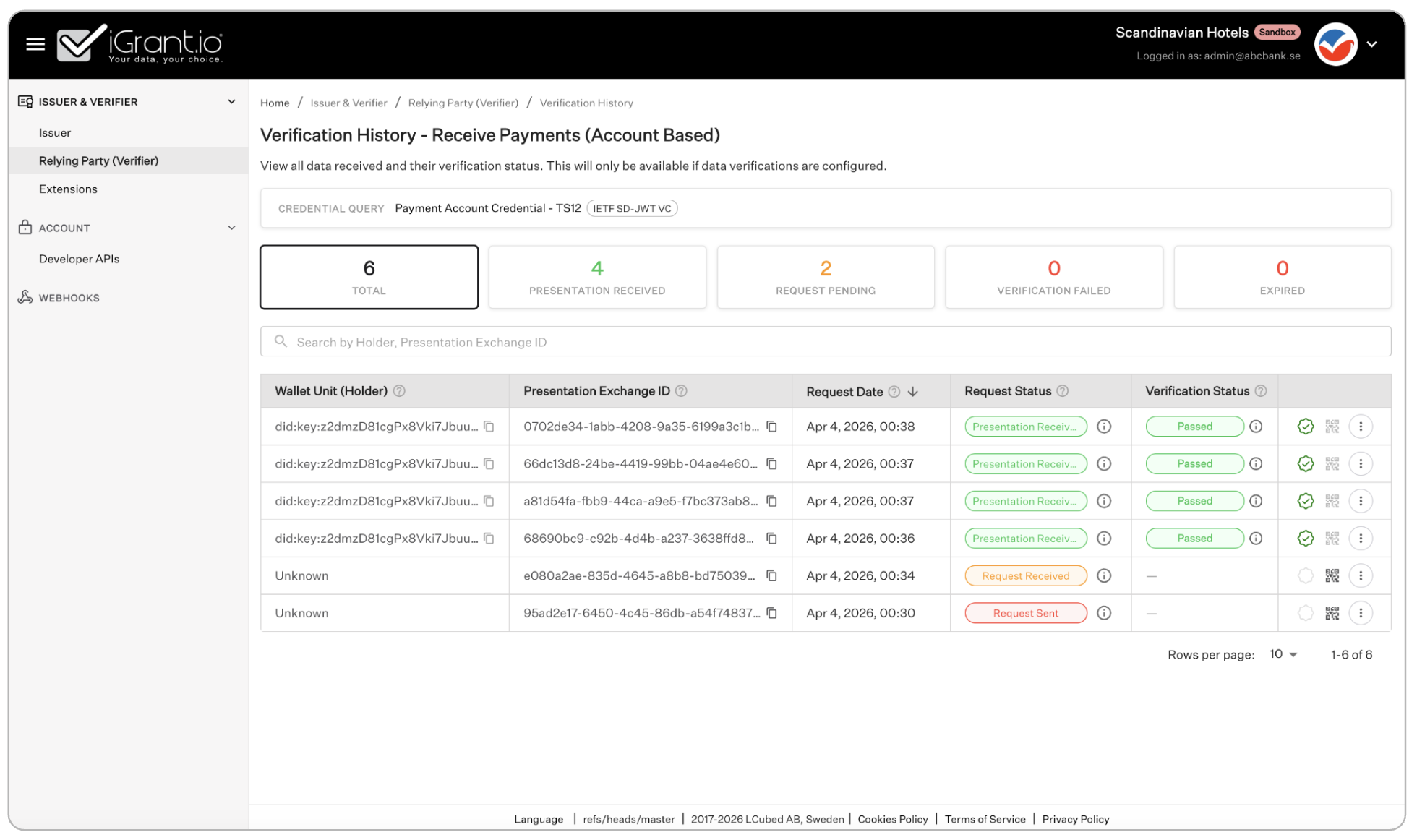
Click on any sandbox organisation to switch into it. The interface will update to show that organisation's workspace, and a Sandbox badge will appear in the header to clearly indicate you are operating in a sandboxed context.
You remain logged in as your main tenant admin (e.g. [email protected]) but can now configure and operate as the sandbox organisation. The screenshot below shows the Scandinavian Hotels sandbox organisation with its own verification history and credential data.
3. Configure issuer and verifier settings
Once inside a sandbox organisation, you have access to the core issuer and verifier tools. You can create credential definitions, configure presentation definitions, set up webhook endpoints, and manage extensions.
The sandbox organisation provides a focused set of features (Issuer and Verifier, Extensions, Account, Webhooks) rather than the full feature set available in your main tenant.
4. Return to your main tenant
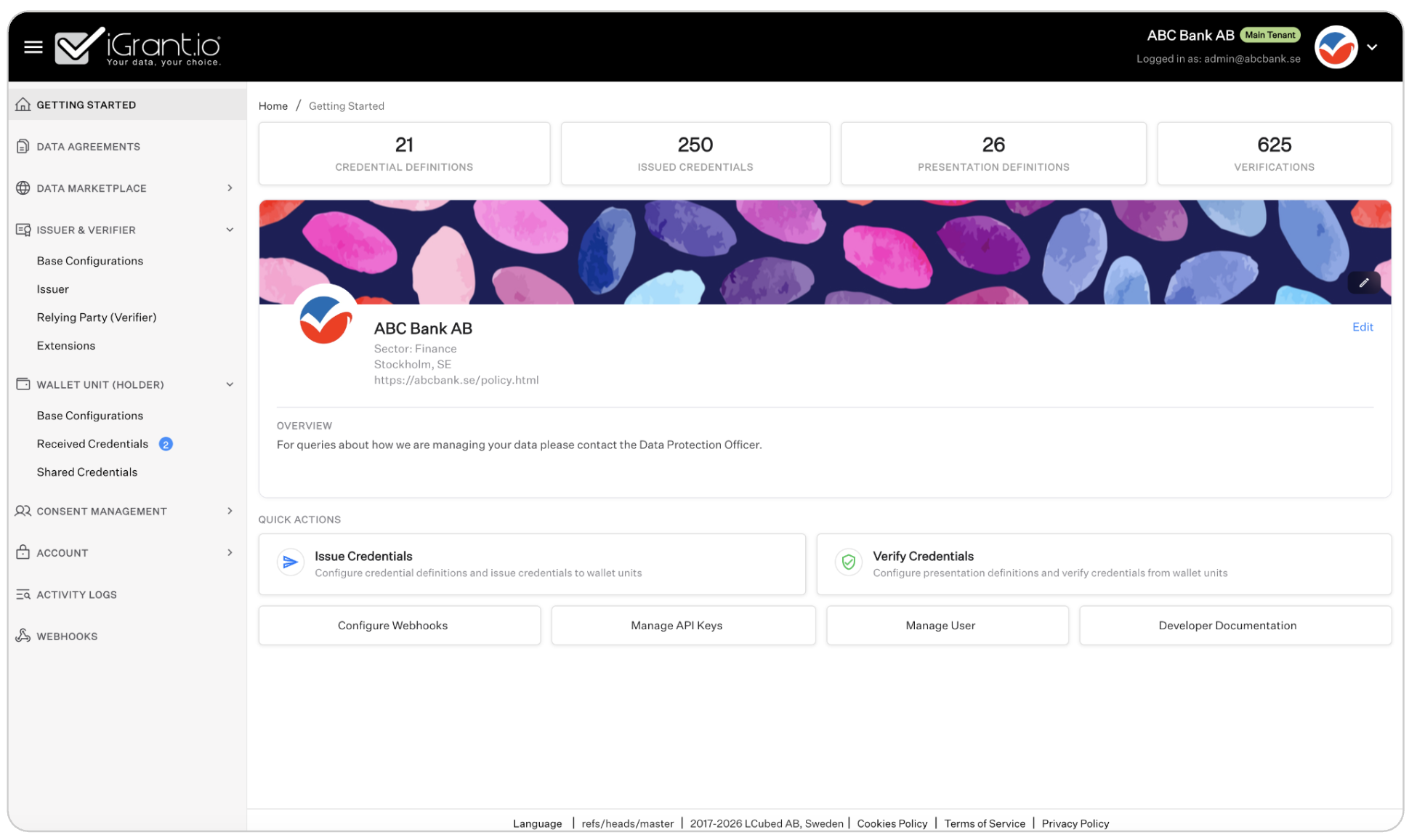
To switch back, open the profile menu and select your main tenant organisation. The Main Tenant badge confirms you are back in your production environment with full feature access.
Available features in sandbox organisations
Sandbox organisations provide a focused set of features tailored for testing credential flows:
- Issuer - create and manage credential definitions, configure issuance settings, and issue test credentials
- Relying Party (Verifier) - set up presentation definitions and verify credentials received from wallet units
- Extensions - configure additional capabilities and integrations for the sandbox organisation
- Webhooks - set up webhook endpoints to test event-driven integrations
- Account - manage the sandbox organisation's profile and basic settings
Features such as Data Agreements, Data Marketplace, Wallet Unit (Holder), Consent Management, and Activity Logs are available only in the main tenant and are intentionally excluded from sandbox organisations to keep the testing environment focused and lightweight.
Limits
Each tenant can create a maximum of five sandbox organisations. This is sufficient to simulate a realistic credential ecosystem with multiple issuers, verifiers, and other participants. The limit is by design. Sandbox organisations are intended for testing and demonstration, not as a substitute for production multi-tenancy.
Example use case
Consider a government agency such as Bolagsverket (the Swedish Companies Registration Office) preparing to issue verifiable credentials for company registration data. Using sandbox organisations, they could set up:
- A PID (Person Identification Data) issuer to simulate national identity credential issuance
- Two verifier organisations representing banks that need to verify company registration credentials
- A verifier representing a legal services firm with different verification requirements
- A test wallet provider to simulate the holder's experience
This entire ecosystem can be configured, tested, and demonstrated from a single Bolagsverket tenant account. No external coordination, no additional contracts, and no extra cost.
Getting started
To create your first sandbox organisation, navigate to your profile menu and look for the Sandbox Organisations section. If you do not see this option, contact your account administrator or reach out to support at [email protected] to have the feature enabled for your tenant.