European Business Wallet Owner ID (EBWOID)
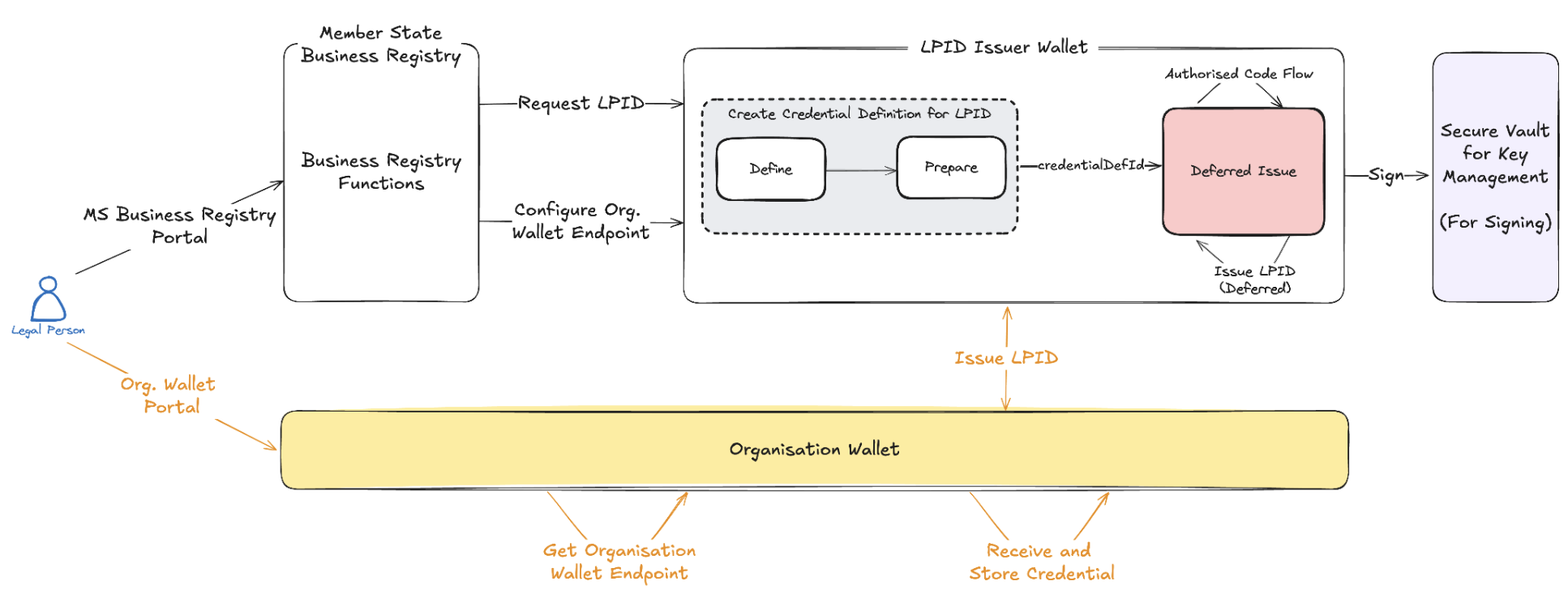
This workflow implements European Wallet Consortium (EWC) RFC005 and employs the OpenID4VCI Issue Credential (In-Time) or OpenID4VCI Issue Credential (Deferred) protocol to issue Legal Person Identification Data (LPID). The steps below outline the process using OpenID for Verifiable Credentials Issuance (OpenID4VCI). This process adheres to the OpenID4VCI specification and is illustrated in the diagram below:
Step 1: Get the API Key (Issuer Admin)
To obtain your API key, sign in to the dashboard and go to Account > Developer APIs > Create API Key (see Get API Keys). Once you have your API key, enter it in the field below and click the Set API Key button to save it for future use.
x509 key of your organisation: a key with a certificate chain. After you set the API key, the page fills in such a key. To choose another key, click the key label next to a signing key field in a request, for example cryptographicKeyIdentifier. To create a key, attach a certificate or see your keys, follow the key management guide. To add your certificate to the NXD trust list, see trust list registration.Step 2: Create Credential Definition (LPID Issuer Admin)
Copy the code block below to create a credential definition as per EWC RFC005. Execute the API available here. From the API response, copy the credentialDefinitionId for use in Step 3.
Request
Response
Step 3: Request and Issue Credential (LPID Issuer: E.g. Bolagsverket or similar)
Before the issuance validation takes place, the legal person submits a request for the issuance of an LPID. In this step, the legal person provides the Organisation Wallet Suite endpoint where the LPID should be issued. If the holder wallet does not expose a <credentialOfferEndpoint>, issuance can still proceed by sharing the credential offer manually (e.g., via QR code). When a <credentialOfferEndpoint> is configured, the issuer can push the offer directly to the holder wallet, enabling issuer-initiated credential issuance.
After completing the required validations, the Issuer proceeds to issue the Legal Person Identification Data (LPID) in the deferred mode. When you run Step 2 on this page, the credentialDefinitionId field below is autofilled automatically (and updated whenever Step 2 is re-run). Enter your holder's credentialOfferEndpoint manually before running Step 3. If you are executing the APIs yourself, replace <credentialDefinitionId> with the ID obtained in Step 2. You can run the JSON code block below using the Run button. Alternatively, use the JSON code block below to structure your request and execute it via the API available here. From the API response, copy the credentialExchangeId of the issuance history (issuanceHistory[0].credentialExchangeId) for use in Step 5.
Request
Response
Step 4: Receive Credential Offer (Legal Person/Holder)
The holder's wallet receives the credential at the configured Organisation Wallet Suite endpoint.
Step 5: Update the Credential Offer with the Claims (Issuer)
When you run Step 3 on this page, the credentialExchangeId path parameter below is autofilled automatically (and updated whenever Step 3 is re-run). If you are executing the APIs yourself, use the credentialExchangeId from Step 3 as the path parameter. Use the code block below to send the claims of the Legal PID (PUT /v4/config/ows/issuer/issuance-history/{credentialExchangeId}/claims), or execute the API available here.
Request
Response
Try It Yourself (With Demo Video)
Legal Person Identification Data Demo: Learn how to issue Legal Person Identification Data (LPID) using OpenID4VCI protocol with iGrant.io Digital Wallets.