Age Verification
This workflow implements the EU Age Verification solution profile, which defines the age verification attestation as an ISO/IEC 18013-5 mdoc with doctype eu.europa.ec.av.1 and boolean age_over_NN claims. It employs the OpenID4VCI Issue Credential (In-Time) protocol to issue the attestation and the OpenID4VP protocol with a DCQL query to verify a proof of age. The attestation is issued with selective disclosure enabled, so the holder can prove, for example, being over 18 without revealing any other attribute. The process is illustrated in the diagram below:
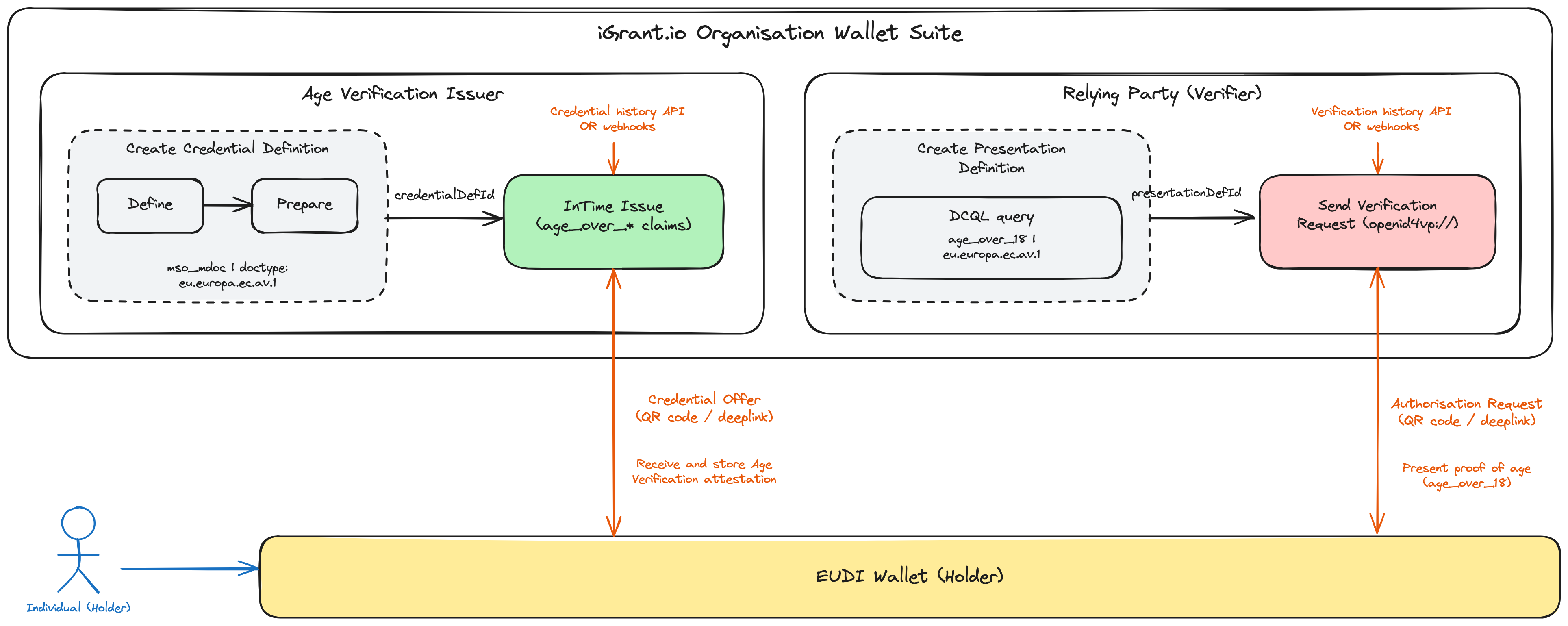
Step 1: Get the API Key (Issuer Admin)
To obtain your API key, please contact [email protected]. Once you have received your API key, enter it in the field below and click the Set API Key button to save it for future use.
x509 key of your organisation: a key with a certificate chain. After you set the API key, the page fills in such a key. If no key has a certificate, it fills in your default key with did:key, for tests only. To choose another key, click the key label next to a signing key field in a request, for example cryptographicKeyIdentifier. To create a key, attach a certificate or see your keys, follow the key management guide. To add your certificate to the NXD trust list, see trust list registration.Step 2: Create Credential Definition (Age Verification Issuer Admin)
Use the code block below to create a credential definition for the age verification attestation in mso_mdoc format with doctype eu.europa.ec.av.1. You can run it using the Run button. Alternatively, execute the API available here. From the API response, copy the credentialDefinitionId and the id field from the credentialDefinitions array for use in Step 3.
Request
Response
Step 3: Issue Age Verification Attestation (Issuer)
After verifying the age of the individual (e.g. against a national eID, passport or PID), the issuer issues the age verification attestation in in-time (InTime) mode with the applicable age_over_NN values. When you run Step 2 on this page, the credentialDefinitionId and id fields below are autofilled automatically (and updated whenever Step 2 is re-run). If you are executing the APIs yourself, replace <credentialDefinitionId> and <id> with the values obtained in Step 2. Run the code block below using the Run button. Alternatively, execute the API available here.
From the API response, note the CredentialExchangeId. Toggle the switch provided to render the credential offer as a QR code.
Request
Response
Step 4: Receive Attestation (Individual/Holder)
The individual scans the QR code (or opens the openid-credential-offer:// deeplink) using the Data Wallet or any other EU Digital Identity Wallet, and receives and stores the age verification attestation.
The issuer can track the issuance lifecycle using the read credential history API with the CredentialExchangeId from Step 3, or alternatively configure webhooks (e.g. the openid.credential.credential_acked event) to get notified about issuance lifecycle events.
Step 5: Create Presentation Definition (Relying Party Admin)
The relying party (e.g. an online service with age-restricted content) creates a presentation definition with a DCQL query requesting the age_over_18 claim from an eu.europa.ec.av.1 mdoc. The label is the usage purpose shown to the individual when they are asked to share the proof of age. You can request additional age_over_NN claims (e.g. age_over_65 for senior discounts) by adding them to the claims array. Run the code block below using the Run button. Alternatively, execute the API available here. From the API response, copy the presentationDefinitionId for use in Step 6.
Request
Response
presentationDefinitionId can be reused to send multiple verification requests (Step 6).Step 6: Send Verification Request (Relying Party)
The relying party requests a proof of age from the holder. When you run Step 5 on this page, the presentationDefinitionId field below is autofilled automatically (and updated whenever Step 5 is re-run). If you are executing the APIs yourself, replace <presentationDefinitionId> with the ID obtained in Step 5. Run the code block below using the Run button. Alternatively, execute the API available here. From the API response, note the presentationExchangeId. Toggle the switch provided to render the authorisation request as a QR code.
Request
Response
Step 7: Present Proof of Age (Individual/Holder)
The individual scans the QR code (or opens the openid4vp:// deeplink) with their wallet, reviews the request and consents to share the age_over_18 claim. With selective disclosure, only the requested boolean claim is revealed; no birthdate or identity attributes are shared.
The relying party can track the verification using the read verification history API with the presentationExchangeId from Step 6, or alternatively configure webhooks (e.g. the openid.presentation.presentation_acked.v3 event) to get notified when the presentation is completed.