Choose Which Issuers and Verifiers Your Organisation Wallet Trusts
- ARF v3.0.0 §6.6.2.2 (the wallet unit authenticates the PID or attestation provider) and §6.6.3.2 (the wallet unit authenticates the relying party instance)
- ETSI TS 119 411-8 V1.1.1 (access certificates) and ETSI TS 119 602 V1.1.1, Annex F (the list of access certificate authorities)
- OpenID for Verifiable Credential Issuance 1.0 (signed issuer metadata) and OpenID for Verifiable Presentations 1.0 (client ID prefixes
x509_san_dnsandx509_hash, DCQLetsi_tl) - WE BUILD WP4 use cases UC-TE-02 (wallet unit evaluates the credential issuer) and UC-TE-04 (wallet unit evaluates the relying party)
In short
- Your organisation wallet (the holder of the iGrant.io Organisation Wallet Suite) checks both sides of an exchange.
- Before it keeps a credential, it can require that it trusts the signer of the credential, the signer of the issuer's metadata, and the signer of the credential's status list.
- Before it answers a presentation request, it can require that it trusts the relying party's access certificate, and that the client ID of the request is one you accept.
- Each check has a Require switch and an accepted list of trust anchors in the holder configuration. For demos and tests, accept the NXD Trust List; for production, the official lists.
What the wallet checks
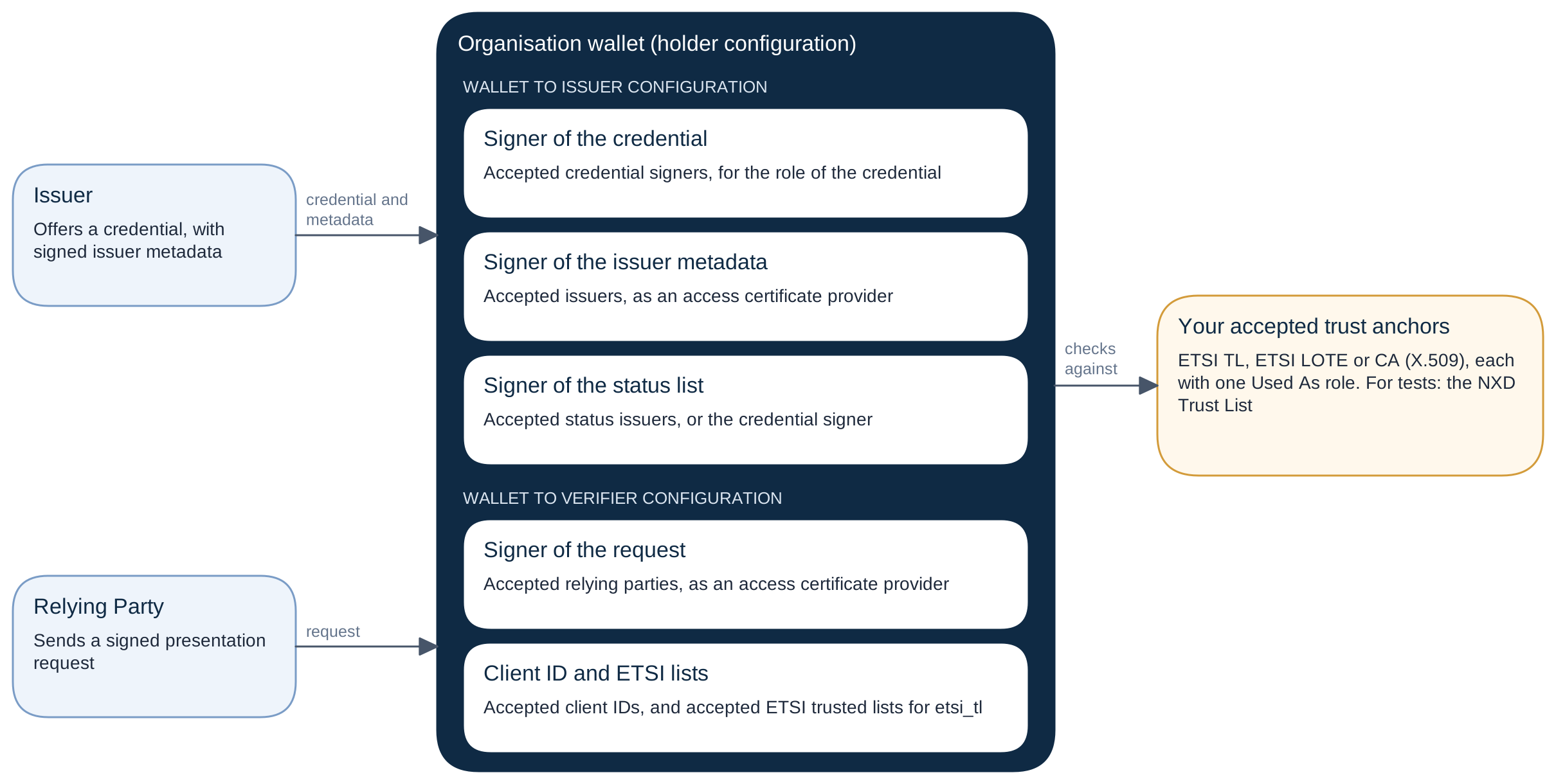
Receiving credentials
In the dashboard, go to Wallet Unit (Holder) > Received Credentials and open Wallet to Issuer Configuration.
Credential signer and issuer trust
- Require a trusted credential signer and Accepted credential signers:
- The wallet refuses a credential unless an accepted trust anchor trusts its signer.
- The role follows the credential: PID provider for a PID, mDL issuer for an mDL, otherwise any issuer role.
- Require a trusted issuer and Accepted issuers:
- The wallet refuses an issuer unless its credential issuer metadata is signed, and an accepted trust anchor trusts the signer as an access certificate provider.
- This is how a wallet authenticates a PID provider or an attestation provider (ARF v3.0.0 §6.6.2.2).
- With the switch off, the wallet does not read the signed metadata.
Status issuer trust
- Turn on Require a trusted status issuer.
- Keep The credential signer may sign the status list on, or select the trust anchors in Accepted status issuers.
- With the switch on, the wallet refuses a credential whose status list signer is not trusted (
held_credential.status_issuer_not_trusted). - At a later refresh of the status, a new result is recorded, and the credential stays in the wallet.
Answering presentation requests
In the dashboard, go to Wallet Unit (Holder) > Shared Credentials, open Wallet to Verifier Configuration and use the card Relying party trust:
- Require a trusted relying party and Accepted relying parties:
- The wallet answers only requests whose signer an accepted trust anchor trusts as an access certificate provider.
- This applies also to the requests that the wallet answers automatically.
- Accepted client IDs (with Require a trusted relying party on): client IDs with the prefix
x509_san_dns:orx509_hash:, for examplex509_san_dns:verifier.example.com.- When the list is set, the
client_idof a request must be one of them. - An empty list narrows nothing.
- A client ID alone never makes a signer trusted. A request must pass both lists.
- When the list is set, the
- Accepted ETSI trusted lists:
- These are the trust anchors of kind ETSI TL or ETSI LOTE that an
etsi_tlitem of a request may name. This list has no switch. - A request whose
etsi_tlitems name only other lists is refused, and the verifier getsaccess_deniedwith the reason.
- These are the trust anchors of kind ETSI TL or ETSI LOTE that an
These lists are checks that the wallet makes itself. It never sends them to an issuer or a verifier.
In the API, they are members of the holder configuration (Update holder configuration):
{
  "requiresTrustedCredentialSigner": true,
  "acceptedCredentialSigners": ["0b7c6d1e-2f3a-4b5c-8d9e-0f1a2b3c4d5e"],
  "requiresTrustedIssuer": true,
  "acceptedIssuers": ["8a9b0c1d-2e3f-4a5b-9c6d-7e8f9a0b1c2d"],
  "requiresTrustedRelyingParty": true,
  "acceptedRelyingParties": ["3f1e5a6b-7c8d-4e9f-8a0b-1c2d3e4f5a6b"],
  "acceptedClientIds": ["x509_san_dns:verifier.example.com"],
  "acceptedEtsiTrustedLists": ["5d4c3b2a-1f0e-4d9c-8b7a-6f5e4d3c2b1a"]
}
The list that you send replaces the stored list, so include the IDs that are already in it.
What the wallet records
| Record | Member | Check |
|---|---|---|
| A held credential | credentialSignerTrustedListCheck | The signer of the credential |
issuerTrustedListCheck | The signer of the signed issuer metadata | |
statusIssuerTrustedListCheck, statusIssuerIsCredentialSigner | The signer of the status list | |
| A holder presentation | relyingPartyTrustedListCheck | The signer of the request |
In the dashboard, a received credential shows the issuer's Access certificate (the signed metadata), the Issuer key and the Status list, each with its trust chip. A shared credential shows the access certificate of the verifier. The registration certificate of the verifier shows Not supported: the wallet does not check registration certificates yet.