Check the Issuer When You Verify a Credential
- ARF v3.0.0 §6.6.3 (presentation to a relying party)
- ETSI TS 119 602 V1.1.1, Annexes D and H, and ETSI TS 119 612 V2.4.1 (the lists of PID, PuB-EAA and QEAA providers)
- OpenID for Verifiable Presentations 1.0: DCQL
trusted_authoritieswith the typesetsi_tlandaki - WE BUILD WP4 use case UC-TE-05: relying party evaluates presented credentials
In short
- A valid signature proves that a credential was not changed. It does not prove that the signer is a PID provider or a recognised attestation provider. A trust check proves that.
- For each credential query of a presentation definition, you can require that a trust anchor in Accepted credential signers trusts the signer of the credential, and that one in Accepted status issuers trusts the signer of its status list.
- These options stay with the verifier: the wallet never sees them. The DCQL
trusted_authoritiesof a query are a separate thing that the wallet does see, so that it offers only matching credentials. - For demos and tests, accept the PID, PuB-EAA, QEAA and EAA lists of the NXD Trust List. For production, accept the official lists.
What the verifier checks
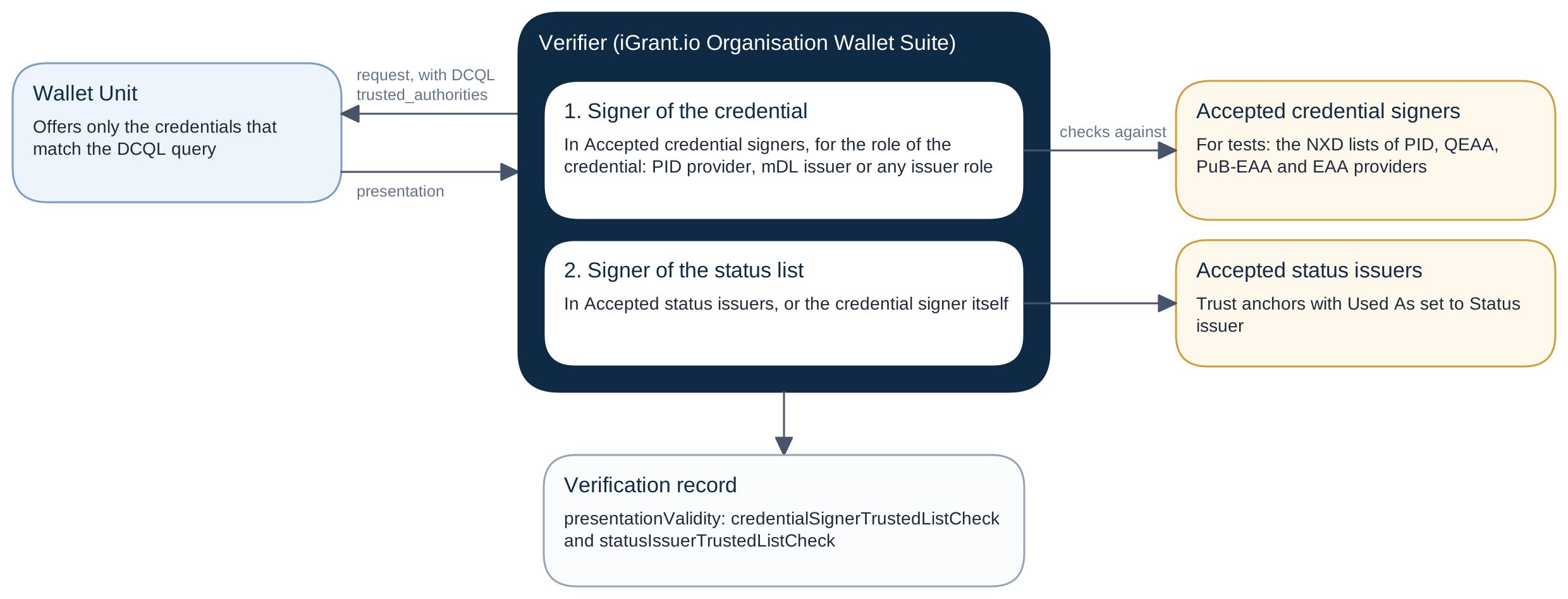
For each presented credential, the verifier:
- Validates the signer certificate chain of the credential against the trust anchors in Accepted credential signers, for the role of the credential:
- PID provider for a PID.
- mDL issuer for an mDL.
- Any issuer role otherwise: PID provider, QEAA provider, PuB-EAA provider, EAA provider or mDL issuer.
- Checks the signer of the status list of the credential against Accepted status issuers. By default, the credential signer may also sign the status list. The check then passes without a list lookup, with the reason
same_as_credential_signer.
See Certificates and Chains for the eight checks on the path, and Trust Roles for the roles.
Turn on the checks
In the dashboard, open a presentation definition and the settings of a credential query:
- Credential signer trust:
- Turn on Require a trusted credential signer.
- Select the trust anchors in Accepted credential signers. The list offers only the trust anchors of the role of the credential.
- Status issuer trust: this has its own switch, which does not follow the credential signer.
- Turn on Require a trusted status issuer.
- Keep The credential signer may sign the status list on, or select the trust anchors in Accepted status issuers. The list offers only trust anchors with Used As set to Status issuer.
In the API, they are options of each credential query of the presentation definition, credentialQueryOptions.<credential query id> (Update presentation definition):
{
  "credentialQueryOptions": {
    "pid": {
      "requiresTrustedCredentialSigner": true,
      "acceptedCredentialSigners": ["3f1e5a6b-7c8d-4e9f-8a0b-1c2d3e4f5a6b"],
      "requiresTrustedStatusIssuer": true,
      "acceptCredentialSignerAsStatusIssuer": true,
      "acceptedStatusIssuers": []
    }
  }
}
The rules of an accepted list:
- A list is required while its switch is on (
trust.accepted_list_required). - Each value must be the ID of one of your trust anchors (
trust.accepted_list_not_a_trust_source). - The trust anchor must be on (
trust.accepted_list_source_disabled), and its role must fit (trust.accepted_list_wrong_role).
Trusted authorities are a filter
The DCQL trusted_authorities of a credential query go to the wallet in the request, so that it offers only credentials from these authorities. They have no Require switch and no role:
etsi_tl: the URL of one of your trust anchors of kind ETSI TL or ETSI LOTE. The verifier uses its stored copy and downloads nothing at the time of the request.aki: an authority key identifier. It helps the wallet find matching credentials, but it is not a proof of trust.
The verifier also checks that each presented credential matches them, without a role: a credential that does not match fails with PRES_TRUSTED_AUTHORITY_MISMATCH.
When a query has both trusted authorities and Require a trusted credential signer, the verifier applies Accepted credential signers after the DCQL query. See DCQL: Trusted Authorities.
What the verification record shows
Each entry of presentationValidity of the verification record has validatedAt and, under the id of the credential query, these members (for a query with multiple, each credential is an item of credentials[] under the id):
| Member | Content |
|---|---|
credentialSignerTrustedListCheck | The check of the signer of the credential |
statusIssuerTrustedListCheck | The check of the signer of its status list |
statusIssuerIsCredentialSigner | true when the credential signer signed the status list |
The codes of the trust findings:
| Code | Meaning | Effect |
|---|---|---|
PRES_CREDENTIAL_SIGNER_NOT_TRUSTED | The signer of the credential is not trusted, and the query requires a trusted credential signer | The credential fails |
PRES_STATUS_ISSUER_NOT_TRUSTED | The signer of the status list is not trusted, and the query requires a trusted status issuer | The credential fails |
PRES_CREDENTIAL_SIGNER_X5C_MISSING | The credential carries no certificate chain of its signer | Advisory |
PRES_CREDENTIAL_SELF_SIGNED | The credential is signed with a key that it names itself, so no issuer vouches for it | Advisory |
TRUST_ENTRY_STATUS | A match passed with an unusual status of the list entry | Warning |
TRUST_LIST_EXPIRED | A match passed against an expired list | Warning |
TRUST_STATUS_CONFLICT | The entries of the signer do not agree on its status. The check used the valid entry | Warning |
TRUST_ENTITY_AMBIGUOUS | Entries of more than one organisation list the signer, and its certificate names none of them | Warning |
In the dashboard, the verification details show the row Issuer Trusted in the checks of each credential. It is advisory, unless the query requires a trusted credential signer: then a signer that is not trusted fails the credential (PRES_CREDENTIAL_SIGNER_NOT_TRUSTED). The trust chip of the issuer opens its trust panel. See Read a Trust Check Result.
Sign your requests
A wallet checks your verifier too, before it presents anything:
- It validates the access certificate of your signed request against its trust anchors.
- It can also check your registration certificate.
Sign your requests with an access certificate key, and get your access certificate listed. See Your Certificates.