Certificates and Certificate Chains: How a Signer Is Validated
- IETF RFC 5280: the X.509 certificate profile, and §6 certification path validation
- IETF RFC 5914: trust anchor format
- IETF RFC 7515 §4.1.6 (the
x5cheader of a JWS) and IETF RFC 9360 (thex5chainheader of COSE, used by mdoc) - ARF v3.0.0 §6.6.3: the chain is sent up to, but not including, the trust anchor
- ETSI TS 119 612 V2.4.1 §5.5.3 and ETSI TS 119 602 V1.1.1 §6.6.3: the digital identity of a listed service
In short
- A signature proves that a key signed the data. A certificate chain links that key to a trust anchor: a certificate or key that the relying party trusts directly, without a chain above it (RFC 5914).
- A signature carries its chain from the signer certificate up to, but not including, the trust anchor. The relying party must already hold the trust anchor.
- The relying party builds the path from the signer certificate to the trust anchor and checks every certificate on it (RFC 5280 §6). A trusted list then adds what the certificate cannot say: whether the party is listed, for which role, and with which status.
- The iGrant.io Organisation Wallet Suite runs eight checks in a fixed order, and shows the result of each one.
What a signature carries
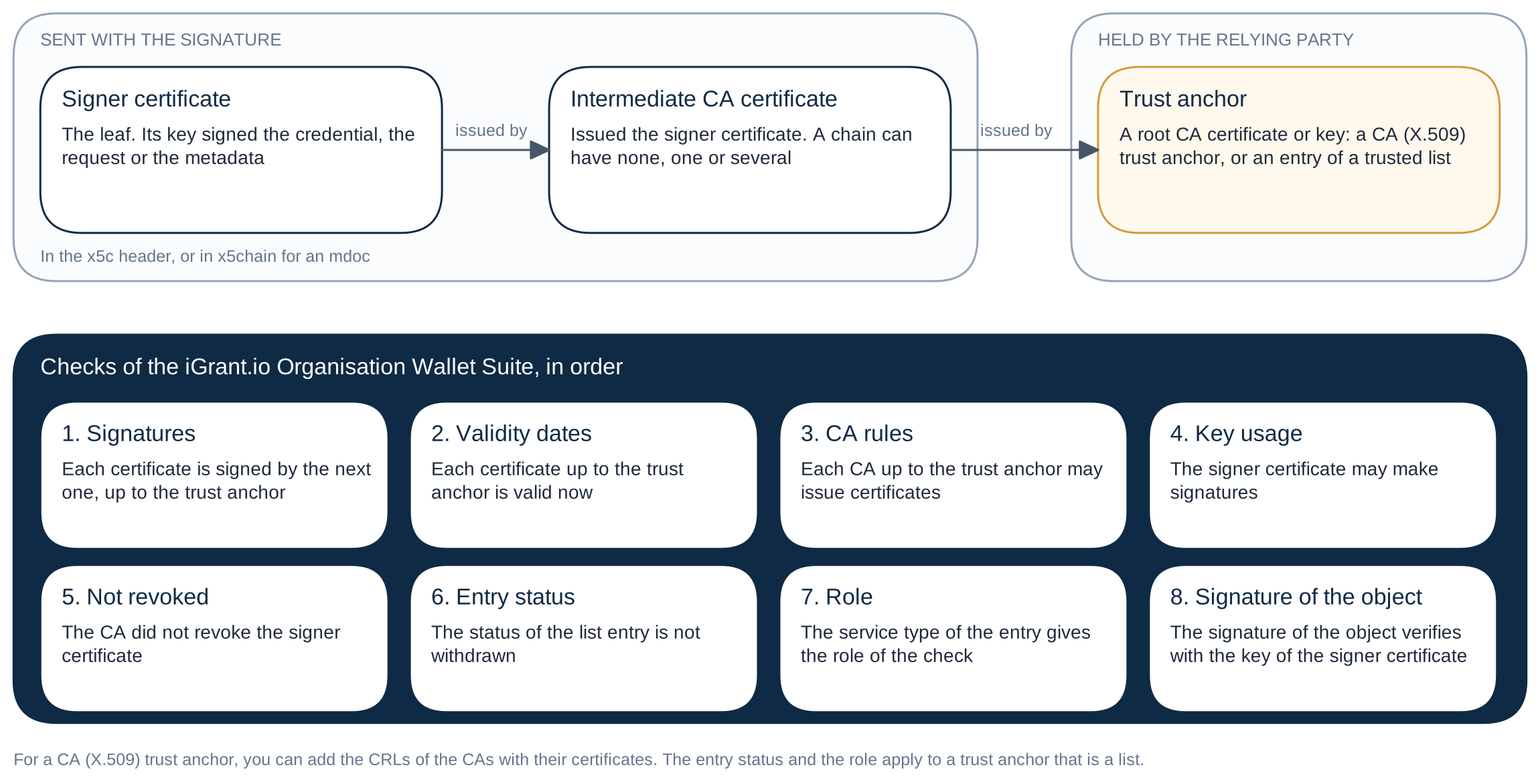
- A JOSE signature (an SD-JWT VC, a signed request, signed issuer metadata, a wallet instance attestation) carries the chain in its
x5cheader, the signer certificate first (RFC 7515 §4.1.6). - A COSE signature (an mdoc, ISO/IEC 18013-5) carries it in
x5chain(RFC 9360). - The trust anchor is not sent (ARF v3.0.0 §6.6.3). A receiver that does not already have it cannot validate the chain. Sending it would not help, because a receiver must never trust a certificate only because the sender included it.
Where a trust anchor comes from
A relying party gets its trust anchors from two places:
- CA certificates that it adds itself. In the dashboard, this is a trust anchor of kind CA (X.509): one or more CA certificates in PEM, optionally with the CRLs of these CAs.
- The entries of a trusted list or a list of trusted entities. Each listed service has a digital identity (TS 119 612 §5.5.3, TS 119 602 §6.6.3). How useful it is depends on its form:
| Digital identity of the entry | Can it anchor a chain? |
|---|---|
| An X.509 certificate (§6.6.3.1) | Yes. The certificate can be in the chain that was sent, or be the CA above it. |
| A public key (§6.6.3.3) | Yes, the key can verify the last certificate that was sent. |
| A subject key identifier (§6.6.3.4) | No. It names a key but cannot verify a signature. |
| A subject name (§6.6.3.2) | No. A name alone never makes a signer trusted. |
A list can name a CA or the signer certificate itself. The EU lists of trusted entities name the CA certificates of the providers. Some pilot lists, such as the access certificate list of the NXD Trust List, name the access certificate of a relying party directly. Then the signer certificate is itself the trust anchor.
In the iGrant.io Organisation Wallet Suite
A check uses only the trust anchors in its accepted list. It looks for every entry that matches the chain, then runs these checks on the path to the trust anchor of the entry it uses:
| # | Check | Passes when |
|---|---|---|
| 1 | Signatures | Each certificate is signed by the next one, up to the trust anchor |
| 2 | Validity dates | Each certificate up to the trust anchor is valid now |
| 3 | CA rules | Each CA up to the trust anchor may issue certificates (RFC 5280 basic constraints) |
| 4 | Key usage | The signer certificate may make signatures |
| 5 | Not revoked | The CA did not revoke the signer certificate |
| 6 | Entry status | The status of the list entry is not withdrawn |
| 7 | Role | The service type of the entry gives the role of the check |
| 8 | Signature of the object | The signature of the credential, request or metadata verifies with the key of the signer certificate |
A list gives no revocation data, so for an entry of a list the check Not revoked is not checked. For a CA (X.509) trust anchor, the check uses the CRLs of each certificate of the path.
When the trust anchor is above the chain. When the list names the CA whose key signed the last certificate that was sent, the Certificate chain of the result shows that CA after the certificates that were sent, under From your trust anchor and its name.
When several entries match, the check uses one of them and says why:
- The same organisation: the entries name the same organisation, and the check uses the entry of the first trust anchor in your accepted list.
- The signer certificate names one organisation: the entries belong to different organisations, and the check uses the entry of the organisation that the signer certificate names.
- No organisation is named: the signer certificate does not name one of them. The signer is trusted for the role only, with a warning.
- The statuses disagree: the check uses the valid entry.
The result of a check is trusted, not_trusted, not_found (the signer is not in a trusted list), not_applicable (the Require switch is off) or error. See Read a Trust Check Result.
Revocation. For a CA (X.509) trust anchor, add the CRLs of the CAs together with their certificates.
Your own signatures
Your organisation is on the other side of the same rule. For each signing key, you choose which certificate of its chain is the trust anchor that receivers must hold. The wallet sends the certificates below it, and not the trust anchor itself. When you choose nothing, the wallet does not send a self-signed root. Receivers then trust your signatures only when one of their trust anchors, a CA (X.509) or an entry of a list for the role, contains that certificate. See Key Management and Register the Certificate in a Trust List.