Publish and Look Up Trusted Entities with the NXD Foundation Trust Registry
- ETSI TS 119 602 V1.1.1, Annexes D to I (the EU lists of PID providers, wallet providers, access and registration certificate providers, PuB-EAA providers, and registrars and registers), in XML and JSON
- ETSI TS 119 612 V2.4.1 (the lists of QEAA and EAA providers)
- ETSI EN 319 132-1 (XAdES Baseline B) and ETSI TS 119 182-1 (JAdES Baseline B) for the signatures of the lists
In short
- The NXD Foundation (NordXDataspace Foundation) runs a trust registry for the EU Digital Identity Wallet ecosystem. It publishes the NXD Trust List: one signed list for each role, at
https://trustlist.nxd.foundation/trust-lists/. - iGrant.io uses the NXD Trust List by default for demos, interoperability tests and all other non-production use.
- The NXD Foundation maintains the entries. Every change re-signs all lists.
- A wallet, issuer or verifier can use the registry in two ways:
- Download a list and validate signers against it locally. The iGrant.io Organisation Wallet Suite does this; see Manage Trust Anchors.
- Ask the lookup API whether a certificate chain, a DID or a key is listed:
POST https://trustlist.nxd.foundation/trust-list/lookup.
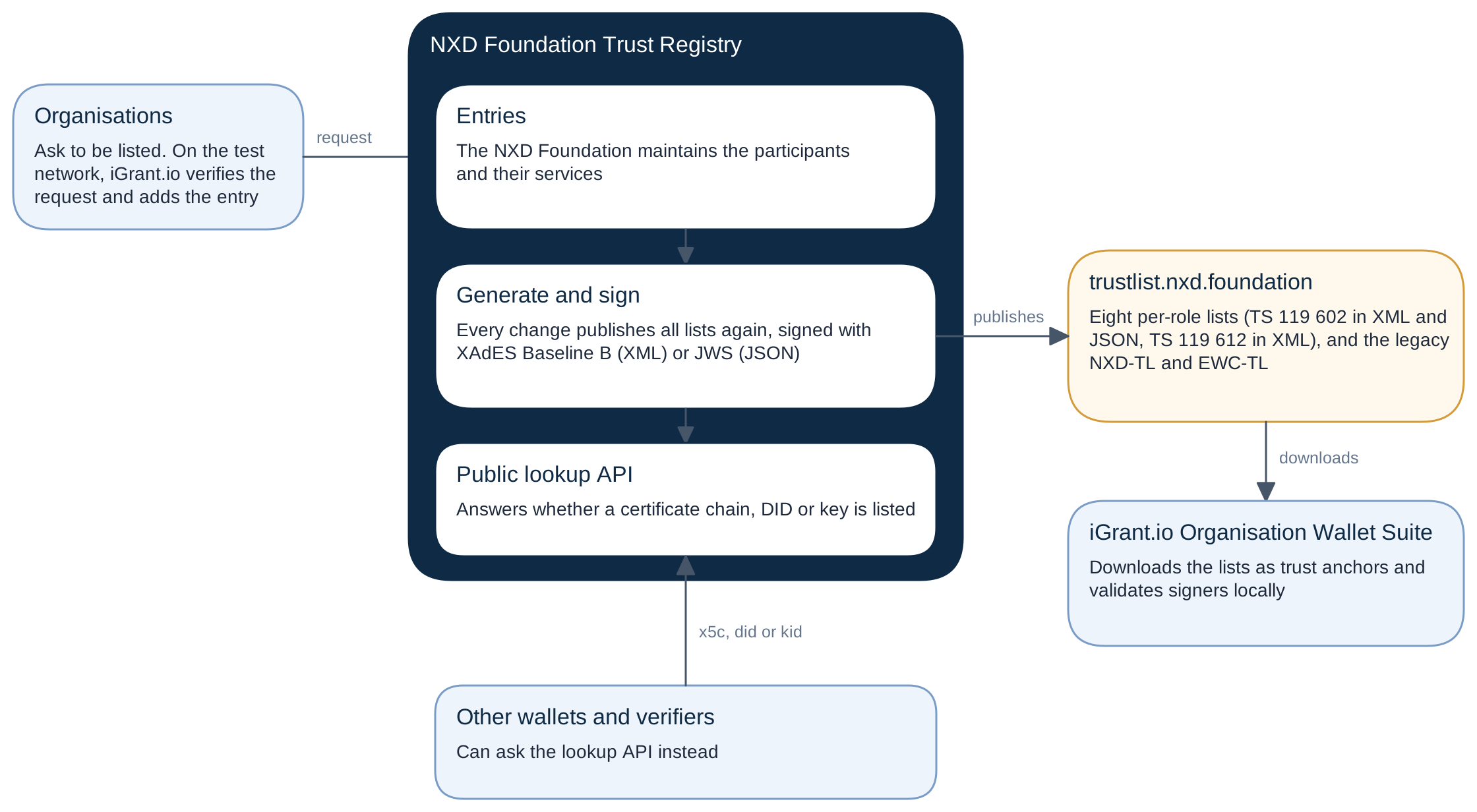
The published lists
| List | Specification | JSON (TS 119 602) | Service types | Add in the dashboard as |
|---|---|---|---|---|
NXD-TL-WalletProviders.xml | ETSI TS 119 602, Annex E | nxd-wallet-providers-lote.json | .../SvcType/WalletSolution/Issuance, /Revocation | ETSI LOTE, Wallet provider |
NXD-TL-PID.xml | ETSI TS 119 602, Annex D | nxd-pid-providers-lote.json | .../SvcType/PID/Issuance, /Revocation | ETSI LOTE, PID provider |
NXD-TL-PubEAA.xml | ETSI TS 119 602, Annex H | nxd-pub-eaa-providers-lote.json | .../SvcType/PubEAA/Issuance, /Revocation | ETSI LOTE, PuB-EAA provider |
NXD-TL-QEAA.xml | ETSI TS 119 612 | http://uri.etsi.org/TrstSvc/Svctype/EAA/Q | ETSI TL, QEAA provider | |
NXD-TL-EAA.xml | ETSI TS 119 612 | http://uri.etsi.org/TrstSvc/Svctype/EAA | ETSI TL, EAA provider | |
NXD-TL-WRPAC.xml | ETSI TS 119 602, Annex F | nxd-wrpac-providers-lote.json | .../SvcType/WRPAC/Issuance, /Revocation | ETSI LOTE, Access certificate provider |
NXD-TL-WRPRC.xml | ETSI TS 119 602, Annex G | nxd-wrprc-providers-lote.json | .../SvcType/WRPRC/Issuance, /Revocation | ETSI LOTE, Registration certificate provider |
NXD-TL-Registrars.xml | ETSI TS 119 602, Annex I | nxd-registrars-and-registers-lote.json | .../SvcType/Register | No role yet |
... stands for http://uri.etsi.org/19602. The service type of an entry is the issuance type of its list. A service that only publishes validity status has the revocation type.
What every list has:
| Lists of trusted entities (TS 119 602) | Trusted lists (TS 119 612) | |
|---|---|---|
| Scheme operator | NXD Foundation | NXD Foundation |
| Scheme territory | EU, as Annexes D to I fix it | SE, the country where the scheme operator is established |
| Status of a service | http://uri.etsi.org/19602/<list type>/SvcStatus/notified, or .../withdrawn | http://uri.etsi.org/TrstSvc/TrustedList/Svcstatus/granted, or .../withdrawn |
| Signature | XAdES Baseline B (XML, enveloped, ECDSA with SHA-256, exclusive canonicalisation); a JWS in a signature member (JSON) | XAdES Baseline B |
| Next update | Six months after the issue date | Six months after the issue date |
Every change of an entry publishes all lists again, with a new sequence number and a new issue date. A withdrawn service stays in its list, so you can see its history, but it no longer validates any certificate.
Legacy lists. The registry also serves two older lists in the TS 119 612 format at https://trustlist.nxd.foundation/trust-lists/legacy/:
NXD-TL.xml, the earlier NXD Trust List.EWC-TL.xml, the list of the EU Digital Identity Wallet Consortium.
Their entries can be identified by a certificate, a DID, a key ID (kid), a JWKS URI, a subject key identifier or a subject name. The per-role lists take X.509 certificates only.
Look up a certificate, DID or key
POST https://trustlist.nxd.foundation/trust-list/lookup with a JSON body that has exactly one of:
| Member | Content |
|---|---|
x5c | The certificate chain, leaf first, as base64 DER: 1 to 8 certificates |
did | A DID, for example did:web:... or did:key:... |
kid | A key identifier |
jwksUri and kid | A JWKS URI, with the kid of the key in that key set. A jwksUri alone is refused. |
A body with none of these is refused with 400: "Request body must contain one of x5c, kid, did, or jwksUri with kid". Other invalid bodies are refused with 422, for example a jwksUri without kid, two of these members, or more than 8 certificates. A body of more than 64 KiB is refused with 413.
curl -X POST "https://trustlist.nxd.foundation/trust-list/lookup" \
  -H "Content-Type: application/json" \
  -d '{ "x5c": ["MIIC...", "MIIB..."] }'
How it matches. The lookup searches the lists in two tiers, and always both:
- The eight per-role lists.
- The chain must validate to a certificate in one of these lists. The certificate store of the operating system is never used, so a certificate from a public CA does not match on that basis alone.
- A match is
end-entitywhen the entry lists the presented certificate itself, andchainwhen the entry lists a CA that the certificate validates up to. - A DID, kid or JWKS URI goes straight to the legacy tier: the per-role lists hold only certificates.
- The legacy lists,
NXD-TL.xmlfirst, thenEWC-TL.xml.
The response lists every entry that matched, the per-role lists first. A certificate can be listed in more than one place, so read all entries, not only the first:
{
  "match": true,
  "entries": [
    {
      "status": "granted",
      "matchType": "end-entity",
      "trustList": {
        "name": "NXD-TL-EAA.xml",
        "url": "https://trustlist.nxd.foundation/trust-lists/NXD-TL-EAA.xml",
        "schemeName": "SE:EN_NXD Foundation - EAA Providers"
      },
      "certificateValid": true,
      "certificateDetails": [
        {
          "subject": "C=SE,O=Example Issuer AB,CN=Example Issuer AB",
          "issuer": "C=SE,O=Example Issuer AB,CN=Example Issuer CA",
          "notValidBefore": "2026-07-14T16:26:36+00:00",
          "notValidAfter": "2027-07-14T16:26:35+00:00",
          "sha256Fingerprint": "5ae5a344...",
          "subjectKeyIdentifier": "3566E350...",
          "authorityKeyIdentifier": "398E5361..."
        }
      ],
      "provider": { "tSPName": "Example Issuer AB", "countryName": "SE" },
      "service": {
        "serviceTypeIdentifier": "http://uri.etsi.org/TrstSvc/Svctype/EAA",
        "serviceStatus": "http://uri.etsi.org/TrstSvc/TrustedList/Svcstatus/granted",
        "serviceName": "Example EAA Issuer",
        "digitalIdentity": ["MIIC..."]
      },
      "permittedCredentials": [],
      "prohibitedCredentials": [
        { "format": "dc+sd-jwt", "vct": "urn:eudi:pid:1" },
        { "format": "mso_mdoc", "doctype": "eu.europa.ec.eudi.pid.1" },
        { "format": "dc+sd-jwt", "vct": "WalletUnitAttestation" }
      ]
    }
  ]
}
When nothing matches, the answer is {"match": false, "entries": []}.
- An expired certificate: in the per-role lists, a listed certificate that is expired or not valid yet still matches. The entry then has
certificateValid: falseand a warning inwarnings, for example "Certificate expired on 2026-01-31". In the legacy lists, it does not match. - A withdrawn service: its certificates do not match.
What a listed entity may issue
Each match carries two arrays of credential types:
permittedCredentials: what the entity may issue.prohibitedCredentials: what it must never issue.
The defaults follow from the list:
| List | permittedCredentials | prohibitedCredentials |
|---|---|---|
| PID providers | The PID: dc+sd-jwt with vct urn:eudi:pid:1, mso_mdoc with doctype eu.europa.ec.eudi.pid.1 | The wallet unit attestation |
| Wallet providers | The wallet unit attestation: dc+sd-jwt with vct WalletUnitAttestation | The PID |
| All other lists | Empty: the list grants a category, such as EAA, not concrete types | The PID and the wallet unit attestation |
The NXD Foundation can change these defaults, so the live answers can differ from this table. They shape the lookup answer only; the signed lists do not contain them. When one certificate matches several entries that do not agree, use the strictest answer: refuse a type that any of its matches prohibits.
prohibitedCredentials of its issuer's match, even when the issuer is listed. An EAA provider on the NXD Trust List must never be accepted as the issuer of a PID.In the iGrant.io Organisation Wallet Suite
- Trust anchors: add the lists that your checks need, with the kind and role of the table above. See Manage Trust Anchors.
- Local checks: the Organisation Wallet Suite downloads each list, checks its signature and validates signers against it locally. It does not call the lookup API, so it does not send the registry the certificates of the parties that it checks.
- Refresh: it downloads a list again at its next update, or after 24 hours if that is earlier. A new entry therefore reaches your checks within a day; select Refresh the list to get it at once.
- Getting listed: iGrant.io adds your organisation to the NXD Trust List for the test network, after it has verified your request. See Register on a Trust List.