Check the Wallet Before You Issue a Credential
- ARF v3.0.0 §6.2.2 (the trust anchors of wallet providers in the Wallet Provider LoTE) and §6.6.2 (issuance)
- ETSI TS 119 602 V1.1.1, Annex E (the list of wallet providers)
- OpenID for Verifiable Credential Issuance 1.0 (key proofs and attestations), and the OAuth 2.0 attestation-based client authentication that carries the WIA
- WE BUILD WP4 use case UC-TE-03: credential issuer evaluates the wallet unit
In short
- Before you issue a credential, you may want to know that the wallet is a genuine wallet unit of a wallet provider that you trust.
- The wallet proves this with a wallet instance attestation (WIA), signed by its wallet provider, and with a key attestation for the key that the credential will be bound to.
- With Require a trusted wallet provider on, the iGrant.io Organisation Wallet Suite issues only when a trust anchor in Accepted wallet providers trusts the signer of these attestations as a wallet provider.
- For demos and tests, accept the NXD Trust List of wallet providers (
NXD-TL-WalletProviders.xml). For production, accept the Wallet Provider LoTE of the EU.
What the issuer checks
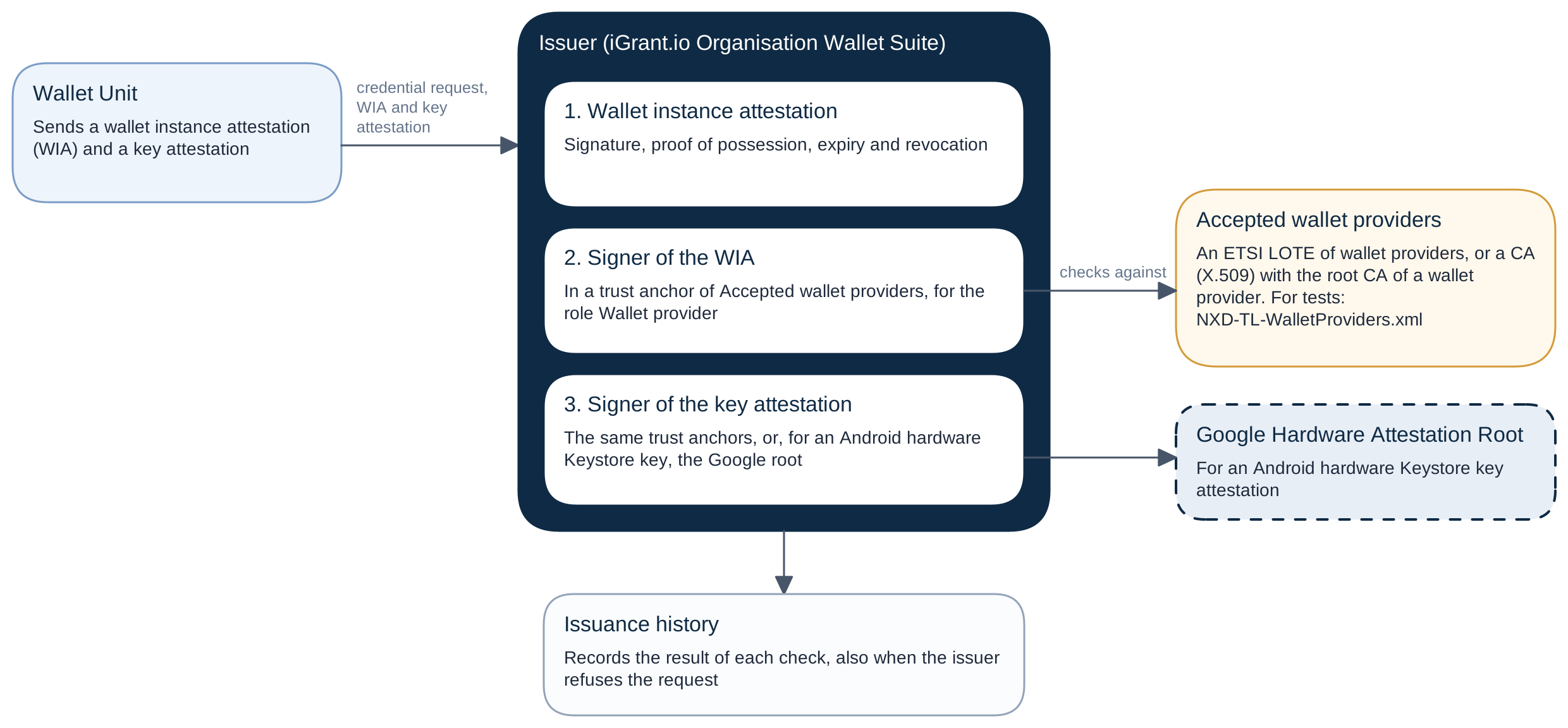
The wallet sends a WIA, and a key attestation for its binding keys. Both carry the certificate chain of their signer in the x5c header.
A key attestation carries one of these chains:
- The chain of a wallet provider: the wallet provider signed the key attestation (mode
wallet_provider). - On Android, the chain of the device's hardware Keystore, up to the Google Hardware Attestation Root: the device key signed the key attestation (mode
android_keystore).
The issuer refuses a key attestation that has neither chain, for example one that the attested key signed itself (KA_ROOT_UNTRUSTED).
iOS. An iOS wallet unit sends a key attestation signed by its wallet provider, because the wallet provider checked Apple App Attest when the wallet unit registered. The issuer therefore checks only the wallet provider.
Android hardware Keystore. A key attestation of this kind has no wallet provider signer, so the issuer runs a platform root check, not a trusted list check:
- The chain must end at the Google Hardware Attestation Root.
- No certificate of the chain may be revoked in the Google attestation status list.
If the issuer's copy of the Google attestation status list is not current, it cannot check revocation. It then refuses a required Android key attestation with 503. It accepts an optional one without a level, with the warning KA_ANDROID_STATUS_UNAVAILABLE.
Turn on the check
In the dashboard, open the settings of a credential definition and go to the card Wallet provider trust:
- Turn on Require a trusted wallet provider. This also makes a WIA required.
- In Accepted wallet providers, select the trust anchors of the wallet providers that you accept. The list offers only trust anchors with Used As set to Wallet provider. Use one of these:
- an ETSI LOTE of wallet providers that includes the wallet provider, or
- a CA (X.509) that holds the root CA certificate of the wallet provider.
- Save.
In the API, these are requiresTrustedWalletProvider and acceptedWalletProviders of the credential definition (Update credential definition):
acceptedWalletProvidersis an array of trust anchor IDs.- It is required while the switch is on (
trust.accepted_list_required). - Every trust anchor in it must be used as
wallet_provider(trust.accepted_list_wrong_role).
What the issuer refuses. With the switch on:
- The wallet must send a valid WIA: signature, proof of possession, expiry and revocation status. Otherwise the issuer refuses the request with
invalid_client. - A trust anchor in
acceptedWalletProvidersmust trust the signer of each WIA, and of each key attestation signed by a wallet provider, for the role wallet provider. Otherwise the issuer refuses withinvalid_client: "Client attestation refused: the wallet provider of the attestation is not trusted for this credential". - A key attestation stays optional, unless the credential configuration requires one.
With the switch off, the issuer runs no trust check. A WIA that the wallet sends must still pass its signature, proof of possession and expiry checks. A WIA that is revoked is recorded, and the request goes on. For development, leave the switch off. The key_storage and user_authentication levels of a key attestation still count when its certificate chain is valid now.
The wallet provider does not use trusted lists for its own wallets. When a wallet asks it for a key attestation, it accepts only a WIA that it signed itself with the current key of its configuration. After the wallet provider replaces that key, its wallets must request a new WIA.
What the issuance history records
The issuance history keeps the result of every check, also when the issuer refused the request:
| Member | Content |
|---|---|
authorisation.walletUnitAttestation.walletProviderTrustedListCheck | The trusted list check of the wallet provider of the WIA. When the wallet provider is not trusted, the validity of the WIA records WUA_WALLET_PROVIDER_NOT_TRUSTED; the WIA itself stays valid. |
authorisation.keyAttestation.walletProviderTrustedListCheck | The trusted list check of the wallet provider of the key attestation (mode wallet_provider), with KA_WALLET_PROVIDER_NOT_TRUSTED when it is not trusted |
authorisation.keyAttestation.platformRootCheck | The platform root check of an Android hardware Keystore key attestation (mode android_keystore) |
authorisation.keyAttestation.validity | Each check of the key attestation (signature, expiry, revocation, nonce, proof key and levels), with its stable codes (KA_*) |
authorisation.walletUnitAttestation.trustRequired, authorisation.keyAttestation.trustRequired | The value of requiresTrustedWalletProvider that applied |
authorisation.walletUnitAttestation.trust, authorisation.keyAttestation.trust | Who makes the attestation trusted: trust_source, with anchorId, anchorName and providerName, or platform_root (Google Hardware Attestation Root), and the result in trusted. null when no check ran. |
With the switch off, each walletProviderTrustedListCheck has the result not_applicable and the reason code not_required. See Read a Trust Check Result.
In the dashboard, the issuance history shows a seal for the WIA of each issuance:
- valid
- valid with a trust warning
- valid, but its wallet provider is not trusted
- not valid
- missing
The Wallet unit attestation and Key attestation cards end with a part Trust. It has one row for who signed the attestation, with its trust chip: Wallet provider, or Hardware attestation root for an Android hardware Keystore key. Select the chip to open its trust panel, for example Trust: Wallet provider. See Read a Trust Check Result.